Executive takeaway
Agentforce Prospecting scheduled runs move prospect research off the seller’s morning. Instead of someone remembering to start a run, the prospecting agent works through a configured Salesforce account report on a weekly schedule. It researches eligible accounts and assigns prospect recommendations to reps within the limits you set.
That matters because manual research is repetitive, uneven between reps, and easy to postpone. A schedule makes it predictable, and open-prospect limits keep the volume within what sellers can review.
Two things don’t change. Sellers still review every recommendation and approve or reject it. And the agent doesn’t send emails or book meetings by itself. RevOps gets a repeatable process, managers get consistent pipeline inputs, and reps start the week with work to evaluate rather than lists to build.
Release timing
Scheduling is covered in the Winter ’27 release note on automating prospecting runs, but the feature first became available in mid-August 2026, ahead of the main release. It’s available to eligible orgs, subject to licensing and configuration.
Before vs after
A comparison of working patterns, not a promise of revenue or lead-quality gains.
| Area | Manual prospecting | Scheduled Agentforce Prospecting |
|---|---|---|
| Research | Reps research accounts one by one when they find time | Weekly scheduled research of accounts in a target report |
| Prioritization | Ad hoc lists that vary by rep | Consistent account and qualification criteria |
| Assignment | Fragmented, often first-come or by request | Configured distribution, such as equally across reps |
| Volume | Unchecked; lists grow faster than reps can work them | Open-prospect limits per rep |
| Next steps | Manual and undocumented | Seller approves or rejects, then acts on approved prospects |
How the workflow actually operates
Based on Salesforce’s explanation of how Agentforce Prospecting runs, a scheduled run moves through five stages:
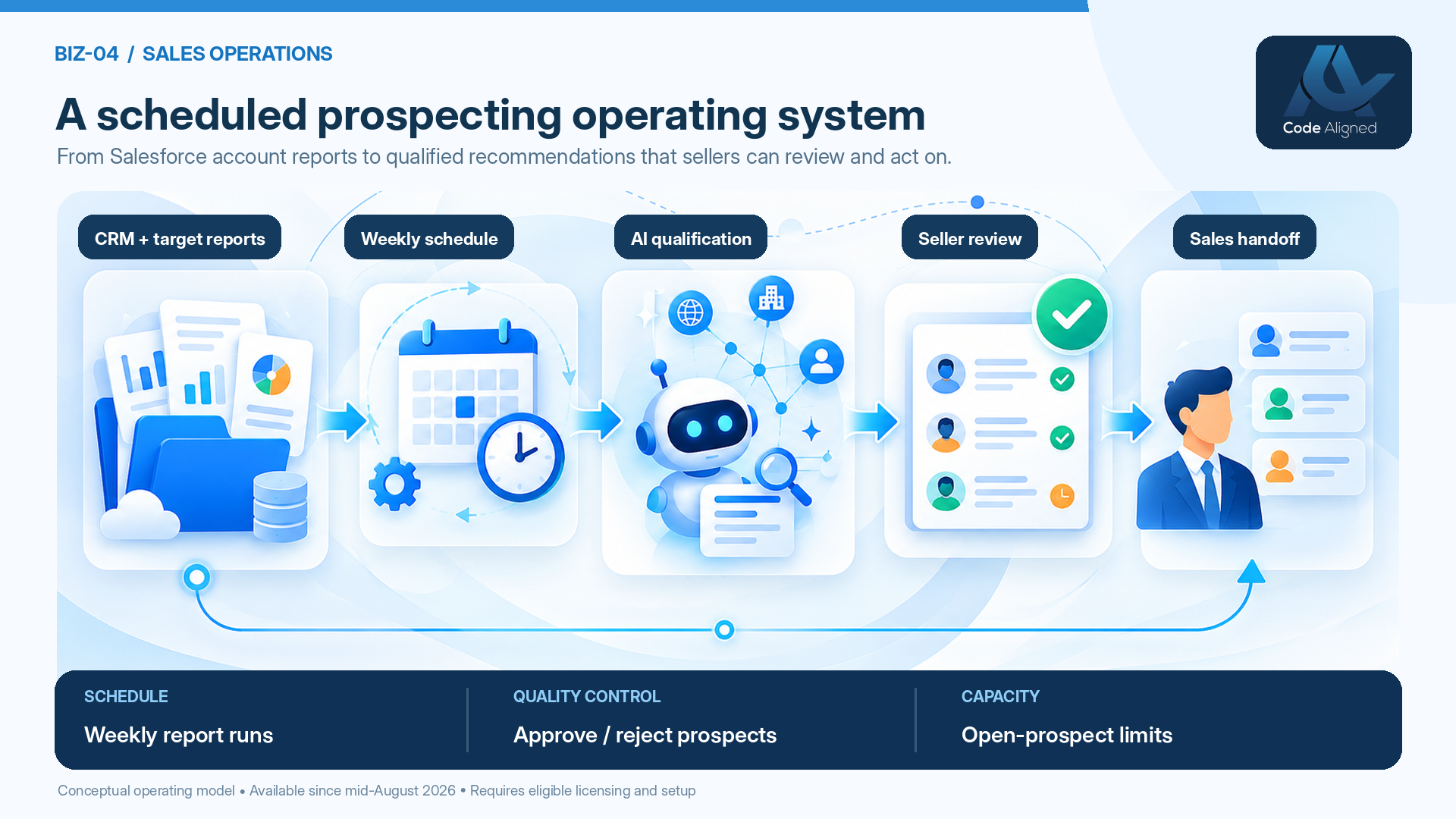
- Target account report. You point the prospecting agent at a configured Salesforce account report. The report defines the pool of accounts the agent can research.
- Weekly schedule. Salesforce’s current documentation describes automatic weekly report runs, with the day, time, and time zone chosen during configuration.
- AI research and qualification. The agent researches eligible accounts against your account and qualification criteria, using CRM data and any connected sources you’ve set up.
- Assignment and recommendations. Prospect recommendations are assigned according to your configured rules and appear in the Prospecting workspace, within each rep’s open-prospect limit.
- Seller approval and follow-up. Reps approve or reject each recommendation. Where configured, they can take further actions, such as adding a prospect to a sales cadence or assigning it to another agent, as described in Manage Agent-Generated Prospects.
Outreach is a separate decision. Scheduled prospecting prepares and recommends; it doesn’t email anyone. If you later automate outreach, that’s another capability with its own configuration, licensing, and consent review.
Salesforce also supports on-demand runs: a manual run of a report, or a manual run on an individual account. These are different modes and can follow different checks and rules, so don’t mix their results with scheduled-run results when you report.
An illustrative use case
This is a hypothetical example to show how the pieces fit. It isn’t a Code Aligned client story, and it contains no measured results.
A B2B professional-services firm sells to three segments: mid-market manufacturing, regional healthcare groups, and logistics providers. Six sellers share the territory. Until now, each rep built their own target list, and the quality of research varied with how busy they were.
The firm sets up one scheduled run per segment report. The example schedule is Monday at 6:00 AM in the org-configured time zone. That time is a configuration choice, not a guaranteed completion time; how long a run takes depends on report size and processing. Prospects are distributed equally among the six reps, with an open-prospect limit set to what each rep can review in a week.
The team plans around two rules. Only eligible accounts are researched. And an account successfully researched in a report run is skipped in later report runs for one calendar month, even if no prospects were found. So week two of the pilot won’t revisit week one’s accounts, and the segment reports need enough fresh accounts to keep runs useful.
| Role | Responsibilities |
|---|---|
| RevOps | Defines the segment reports and qualification criteria, sets open-prospect limits from review capacity, and owns the measurement plan |
| Salesforce admin | Enables the feature, assigns permission sets, configures data sources and schedules, runs the test cohort, and monitors runs |
| Frontline sales manager | Sets the review deadline, checks rejection reasons in weekly one-to-ones, and coaches reps on approved prospects |
Implementation runbook
The steps below follow Salesforce’s Turn On Agentforce Prospecting documentation and the Winter ’27 release note. Menu and button names can change, so confirm the live UI in current Salesforce Help.
Prerequisites
- Licensing: Lightning Experience in Enterprise, Performance, Unlimited, or Developer edition with a qualifying Agentforce for Sales or Agentforce for an Industry add-on, or a qualifying Agentforce 1 Sales or Industry edition. Confirm entitlements with Salesforce.
- Platform: Agentforce and Salesforce Foundations enabled.
- Data: clean account data, and a decision on which optional inputs to use, such as Einstein Activity Capture history, conversation insights, or connected data vendors. None of these are available by default. Each needs its own integration, permissions, and configuration, and vendors may charge separately.
Setup
- Turn on Prospecting from Salesforce Go > Agentforce for Sales.
- Assign permission sets: the prospecting manager permission set for people who configure agents, and the seller permission set for reps who review prospects.
- Select the target account report. Build it around a defined segment, not “all accounts”.
- Set qualification rules: the account and qualification criteria the agent researches against.
- Configure distribution and limits. Per the release note, create or edit a prospecting agent. On Assign Prospects, choose Distribute equally amongst sales reps, enter the maximum open prospects per rep, and configure the run timing.
- Schedule the run: pick the day, time, and time zone for the weekly report run.
- Run a test. Validate a small set of named target accounts before broad enablement, and check the recommendations with the reps who know those accounts.
- Agree the approval workflow: who reviews, by when, and what happens to approved prospects.
- Set governance: owners for the report, criteria, limits, and usage monitoring.
Release note vs current docs
The Winter ’27 release note describes configuring run timing on the Assign Prospects step. Salesforce’s current operating documentation describes the weekly schedule with day, time, and time zone. Where they differ, follow the current Help documentation for live behavior.
Operational design decisions
The configuration is the easy part. These decisions decide whether the workflow helps or just adds noise:
- Choose account cohorts deliberately. Separate reports by segment, region, or tier make results easier to compare and tune.
- Set the open-prospect cap from review capacity. Start from how many recommendations a rep can review well in a week, not from how many the agent could produce.
- Set a review deadline. For example, review within two business days. A rep at the limit may not receive new prospects from report runs until existing ones are reviewed, so stale queues block new work.
- Capture rejection reasons. Rejected and duplicate prospects are your best tuning data. Agree on categories such as wrong persona, existing contact, or not a fit.
- Coordinate with Sales Engagement, if licensed. Decide whether approved prospects go into a cadence, and who owns that cadence. Don’t let anyone assume prospects get emailed automatically.
- Plan for regions. Choose time zones so prospects are ready before each region’s working week starts.
- Fix data quality first. Incomplete or duplicate accounts produce weak research and duplicate prospects.
Important limits and caveats
Review Salesforce’s Considerations for Using Agentforce Prospecting before rollout. The points that most affect planning:
- Weekly schedule: current documentation describes automatic runs on a weekly schedule.
- One-month skip: an account successfully researched in a scheduled or manual report run is skipped in later report runs for one calendar month, even if no prospects were found. Week-over-week numbers will shift as accounts drop in and out.
- Different run modes: manual individual-account runs behave differently from scheduled and manual report runs.
- Prospects aren’t approved leads: open-prospect limits count recommendations awaiting review, not your active approved leads.
- Licensing and access: users and actions need the right entitlements and permissions. Not every action is enabled in every org.
- Data permissions: connected vendors need their own permissions and agreements, and the agent can only use data it can access.
- Usage costs: there are metered-usage considerations, including Flex Credit-based actions. See Prospecting billing and usage.
- Records and duplicates: understand how approved prospects become CRM records in your org, and confirm duplicate rules before scaling.
- Human review: recommendations are research, not verified facts. Quality control stays with your sellers.
- Compliance: check consent and data-protection obligations for each region before contacting prospects. This article isn’t legal advice.
- Sandbox to production: if you configure in a sandbox first, re-check reports, permissions, and vendor connections in production rather than assuming they carry over.
Measurement plan
Measure baselines and targets during the pilot. We deliberately leave them blank rather than quote benchmarks that don’t apply to your business.
Reading weekly results correctly
Because successfully researched accounts are skipped in report runs for one calendar month, the accounts researched in week one and week three of a pilot are different populations. A drop in prospects created doesn’t necessarily mean the agent got worse. It may mean the report has fewer eligible accounts left. Track the number of accounts researched alongside prospects created, report scheduled runs separately from manual runs, and compare results by account cohort over a full month rather than week to week. Also remember that a rep at their open-prospect limit receives nothing new. Low volume for one rep is often a review backlog, not a research problem.
| Metric | Definition | Baseline | Pilot period | Owner | Interpretation |
|---|---|---|---|---|---|
| Recommendation acceptance rate | Approved ÷ reviewed | Measure in pilot | Weekly | RevOps | Low rates point to criteria or report issues |
| Median time to approve | From recommendation to approve or reject | Measure in pilot | Weekly | Sales manager | Long times signal limits set above review capacity |
| Approval to first action | From approval to the seller’s first logged action | Measure in pilot | Weekly | Sales manager | Shows whether approved prospects get worked |
| Meeting conversion | Meetings ÷ approved prospects, within a set attribution window | Measure in pilot | End of pilot | RevOps | Fix the window in advance; compare cohorts, not anecdotes |
| Rep adoption | Share of reps reviewing their queue by the agreed deadline | Measure in pilot | Weekly | Sales manager | Low adoption usually means a workflow problem, not a tool problem |
| Rejection reasons | Distribution of rejection categories | Measure in pilot | Weekly | RevOps | Guides changes to criteria, reports, and data |
| Research effort avoided | Estimated from tracked time samples of manual research | Measure in pilot | Before and during | RevOps | An estimate; label it as one |
| Cost per approved prospect | Consumption and cost ÷ approved prospects | Measure in pilot | End of pilot | Salesforce admin with finance | Shows whether usage costs are proportionate |
A 30-day controlled pilot
Thirty days is a useful target, not a fixed timetable. Org readiness, licensing, and data work can stretch individual phases.
- Phase 1: data and readiness. Confirm licensing and permissions, clean the target account data, build segment reports, agree on qualification criteria, and capture baseline research time.
- Phase 2: configuration and testing. Turn on Prospecting, assign permission sets, configure distribution, limits, and schedules, and validate recommendations on a small set of named accounts.
- Phase 3: limited weekly runs. Run the schedule for a small cohort of reps, with a review deadline and rejection reasons in place.
- Phase 4: measurement and optimization. Review the measurement plan, adjust criteria, limits, and reports, and decide whether to expand.
- Named owner for every report and schedule
- Open-prospect limit tied to review capacity
- Review deadline agreed with sales managers
- Usage and cost monitored weekly
Frequently asked questions
Does scheduled Prospecting send emails?
No. Agentforce Prospecting researches accounts and recommends prospects for sellers to review. It doesn’t send emails or book meetings by itself. Where configured and licensed, a seller can take further actions, such as adding an approved prospect to a sales cadence. Any outreach automation is a separate capability you choose to set up.
Can every Salesforce edition use it?
No. Salesforce documents Agentforce Prospecting for Lightning Experience in Enterprise, Performance, Unlimited, and Developer editions with a qualifying Agentforce for Sales or Agentforce for an Industry add-on, or a qualifying Agentforce 1 Sales or Industry edition. Users also need the right permissions. Confirm licensing with Salesforce.
Does it research the same account every week?
No. According to Salesforce, after an account is successfully researched in a scheduled or manual report run, it’s skipped in later report runs for one calendar month, even if no prospects were found. A manual run on an individual account follows different rules.
Can sales reps reject prospects?
Yes. Recommended prospects appear in the Prospecting workspace, where reps can approve or reject them. Where configured, they can also take further actions, such as adding a prospect to a sales cadence or assigning it to another agent.
What does it cost?
It depends on your contract. Agentforce Prospecting requires qualifying licenses and has metered-usage considerations, including actions billed in Flex Credits, as described in Salesforce’s billing and usage documentation. Third-party data vendors may carry their own costs. Confirm pricing and consumption with Salesforce before you scale.
Official Salesforce references
Product behavior in this article is based on the following Salesforce documentation. Confirm current behavior, licensing, and UI names before you implement.