Why good opportunities get lost in existing CRM records
Most prospecting effort goes into finding new names. Meanwhile, the CRM already holds people who have shown interest: a contact who attended a product demo last spring, a buyer who replied to a proposal before a budget freeze, an operations lead who joined a webinar. Over time those relationships go quiet. Then they’re buried among thousands of contacts that look identical in a list view.
The reason is rarely neglect. Sellers change territories, deals stall and are closed out, and nobody has time to re-read a year of activity history before deciding whom to call. Prospecting tools that treat every contact the same make the problem worse, because a warm relationship and a cold record compete on equal terms.
How to read this article
We distinguish three kinds of content. Documented statements describe Salesforce functionality and link to official sources. Recommended practices are Code Aligned’s implementation advice. Illustrative examples are hypothetical and contain no customer results.
What’s changed: a 12-month engagement boost
According to the Salesforce release note on prioritizing engaged contacts, Agentforce Prospecting can now boost contacts who engaged with your organization in the preceding 12 months. Admins turn the boost on per prospecting agent and choose an engagement level, which controls how strongly past engagement influences the agent’s recommendations.
Two clarifications matter for planning:
- Timing. The capability became available in mid-August 2026 and is also covered in the Winter ’27 release documentation. It wasn’t first introduced with the Winter ’27 release.
- Scope. Boosting affects prioritization only. It isn’t a conversion predictor, and it doesn’t contact anyone. Sellers still review every recommendation.
Before vs after
A conceptual comparison of working patterns. It doesn’t predict results for your business.
| Area | Broad manual prospecting | Engagement-aware prioritization |
|---|---|---|
| Starting point | Large lists of accounts and contacts, treated equally | Recommendations that give extra weight to contacts with recent engagement |
| Research | Sellers dig through activity history record by record | The agent considers recorded engagement from the past 12 months |
| Warm relationships | Easily lost after territory or owner changes | More likely to resurface in recommendations |
| Control | Depends on each seller’s habits | An admin-configured engagement level per agent |
| Decision | Seller decides whom to contact | Seller still decides: approve or reject each recommendation |
How Agentforce Prospecting works
Salesforce’s Agentforce Prospecting documentation describes an agent that researches accounts and recommends prospects for sellers to act on. At a high level:
- CRM context. The agent works from your Salesforce records, such as accounts, contacts, and leads, scoped by the agent’s configuration.
- Connected activity sources. Engagement can only be recognized if it’s recorded in sources the agent can access, for example activity captured in Salesforce or connected data sources you’ve set up. None of these sources are on by default, and each needs its own configuration and permissions.
- Prospect recommendations. The agent produces recommendations. With the engagement boost on, contacts with engagement in the past 12 months get more weight, according to the level you choose.
- Salesperson review. Sellers review recommendations and approve or reject them. Anything that follows, such as outreach, is a separate, explicit step.
A realistic business example
This is an illustrative, hypothetical scenario. It isn’t a Code Aligned client story, and it describes no measured results.
A B2B software company sells workflow tools to mid-market manufacturers. Its eight-person sales team uses Agentforce Prospecting against a report of target accounts. Last year the company ran several webinars and a round of product demos. Many attendees never became opportunities, and two of the reps who ran those demos have since moved to other territories.
RevOps turns on Boost Contacts with Past Engagement for one prospecting agent and leaves a second agent, covering a similar segment, unchanged as a comparison. Over the following weeks, the boosted agent’s recommendations include more contacts with recorded activity, such as the operations manager who attended a demo nine months ago and the plant director who replied to a follow-up email.
The reps still review each recommendation. Some boosted contacts are rejected: one has left the company, another’s engagement was a support question, not buying interest. The team records those rejection reasons. At the end of the pilot, RevOps compares acceptance, responses, and meetings between the two agents before deciding whether to keep the setting or change the level.
Implementation guide
Licensing and access
Access depends on supported editions, licenses, permissions, and feature configuration. Check Salesforce’s Turn On Agentforce Prospecting documentation for current requirements, and confirm entitlements with your Salesforce account team before planning a rollout.
Four implementation steps
Step 1: prepare access and data. Confirm licenses and assign the prospecting permission sets to the people who configure agents and the sellers who review prospects. Then audit activity capture. If emails, meetings, and calls aren’t linked to the right contacts, the boost has little to work with.
Step 2: connect activity sources. Decide which sources the agent should use and set each one up with the integration and permissions it needs. Some third-party sources may carry their own costs.
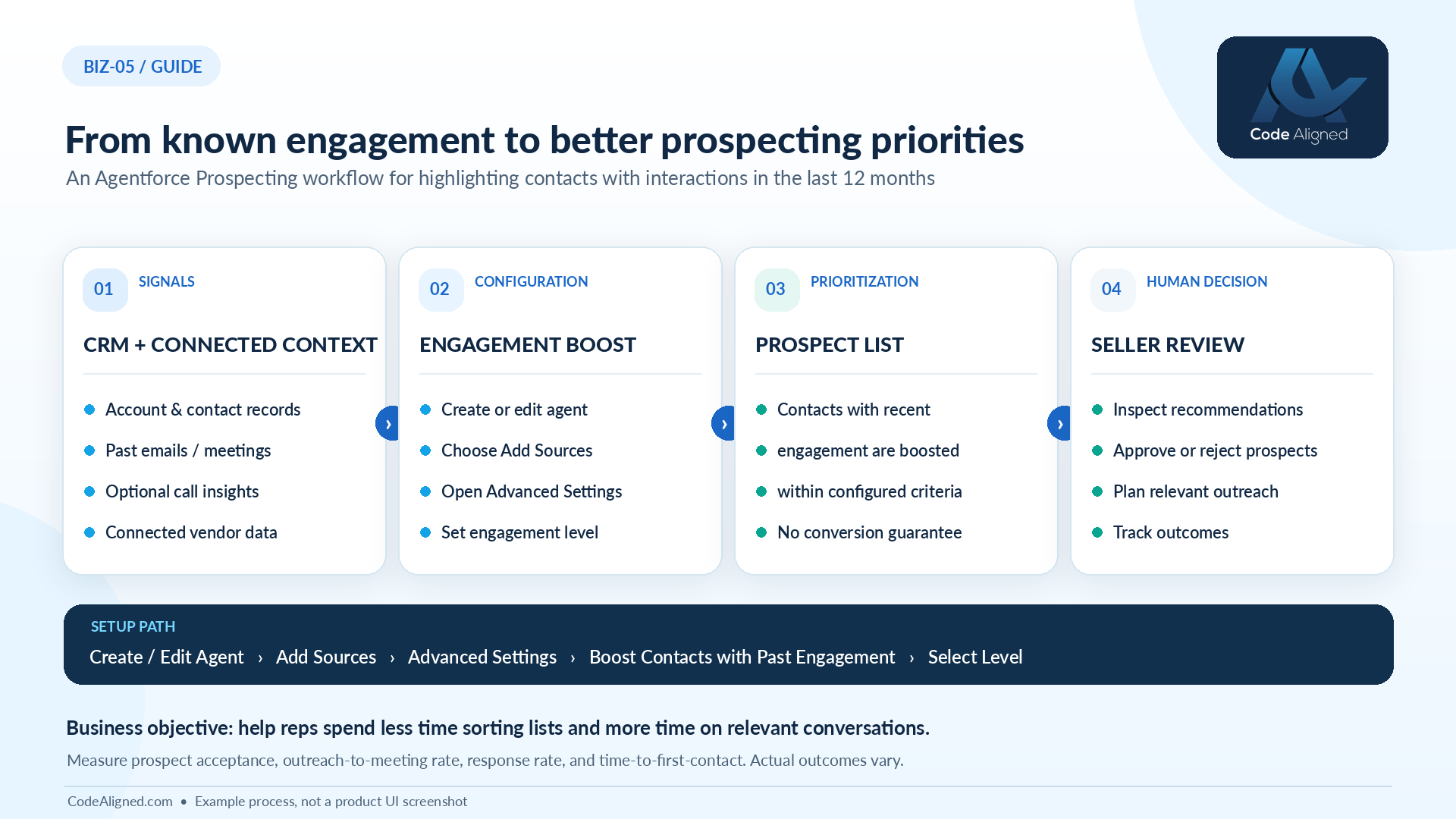
Step 3: turn on the engagement boost. The documented setup path is:
- Create or edit a prospecting agent.
- Go to Add Sources.
- Open Advanced Settings.
- Select Boost Contacts with Past Engagement.
- Select the engagement level.
Step 4: test, pilot, and measure. Run the agent against accounts your team knows well and check whether the boosted contacts make sense. Then run a measured pilot (see Measurement below).
Don’t deploy agent configurations with change sets
Salesforce advises against deploying Prospecting Agent configurations through change sets or metadata deployment. Create production configurations through the supported Setup or Agentforce Builder experience. Use your sandbox to design and document the settings, then recreate them in production.
Testing checklist
- Pick test accounts with known recent engagement, and some with none
- Confirm engaged contacts appear in recommendations as expected
- Check that activity older than 12 months isn’t treated as recent
- Verify sellers only see records they’re permitted to access
- Compare results at different engagement levels before choosing one
- Record usage consumed by test runs to estimate pilot costs
Potential business outcomes
These are effects to test for, not promised results:
- Less prospect research effort. Sellers spend less time combing activity history to find people who’ve engaged before.
- Better-informed prioritization. Relationships that already exist get considered alongside new names, rather than lost after owner or territory changes.
- More relevant outreach. When a seller approves a boosted contact, they can open with context from the earlier interaction instead of a cold introduction.
Whether these effects show up depends on the quality of your activity data, the engagement level you choose, and how consistently sellers review recommendations.
Implementation risks
Review Salesforce’s Considerations for Using Agentforce Prospecting alongside these risks:
- Missing activity history. Engagement that was never captured, or was logged against the wrong record, can’t be boosted.
- Inaccurate data. Outdated contacts, duplicates, and people who’ve changed jobs can be boosted just as easily as live opportunities.
- Engagement isn’t intent. A support ticket or an unsubscribe request is engagement too. Sellers need to judge the context.
- Permission boundaries. Agents and users only see data they’re allowed to access. Check sharing rules before you assume coverage.
- Consumption costs. Agentforce Prospecting has metered-usage considerations. Review Salesforce’s Agentforce billing documentation and monitor usage from the first test run.
- Human review. Recommendations are suggestions. Skipping review risks contacting people with poorly timed or unwelcome outreach, so keep consent and privacy obligations in view.
Measurement: baseline vs pilot
As a recommended practice, compare a boosted prospecting agent with an unboosted baseline covering a similar segment and period. Fill in the figures from your own data. We don’t supply benchmarks.
| Metric | Definition | Baseline (no boost) | Pilot (boost on) |
|---|---|---|---|
| Acceptance rate | Approved recommendations ÷ reviewed recommendations | Measure | Measure |
| Response rate | Approved prospects who reply ÷ approved prospects contacted, within a fixed window | Measure | Measure |
| Meeting rate | Meetings booked ÷ approved prospects, within the same window | Measure | Measure |
| Time to first contact | Median time from approval to the seller’s first outreach | Measure | Measure |
| Rejection reasons | Share of rejections by category, such as left company or not a buyer | Measure | Measure |
| Research time | Sampled seller time spent on prospect research per week | Measure | Measure |
| Cost per approved prospect | Usage consumed ÷ approved prospects | Measure | Measure |
Agree the attribution window and segment definitions before the pilot starts, and give it enough time for meetings to happen. A higher acceptance rate with no change in meetings may simply mean sellers like familiar names.
Frequently asked questions
What does “boost contacts with past engagement” actually do?
It tells the prospecting agent to give more weight to contacts who engaged with your organization in the preceding 12 months when it recommends prospects. You choose the engagement level in the agent’s Advanced Settings. It influences prioritization. It doesn’t guarantee that a boosted contact will convert.
Will the agent contact these people automatically?
No. Agentforce Prospecting recommends prospects for sellers to review, approve, or reject. Boosting changes which contacts are prioritized, not whether anyone is contacted. Any outreach automation is a separate capability with its own configuration.
Is this a Winter ’27 feature?
It’s included in the Winter ’27 release documentation, but it became available in mid-August 2026, before the main release.
Where do we turn it on?
Create or edit a prospecting agent, go to Add Sources, open Advanced Settings, select Boost Contacts with Past Engagement, and choose an engagement level. Availability depends on your edition, licenses, permissions, and feature configuration.
Can we deploy our prospecting agent configuration from a sandbox with change sets?
Salesforce advises against deploying Prospecting Agent configurations through change sets or metadata deployment. Create production configurations through the supported Setup or Agentforce Builder experience, and use the sandbox to design and document settings.
What if our activity history is incomplete?
The agent can only recognize engagement recorded in sources it can access. If emails, meetings, or calls aren’t captured or linked to the right contacts, those contacts won’t be boosted. Audit your activity capture before relying on the setting.
Does it change what Agentforce Prospecting costs?
Agentforce Prospecting has metered-usage considerations described in Salesforce’s billing documentation. Treat consumption as a pilot metric, and confirm pricing and how usage is calculated with Salesforce.
How Code Aligned can help
The engagement boost is a single setting. Making it useful depends on the work around it: clean contact data, complete activity capture, sensible prospecting agent design, clear review routines, and honest measurement. That’s where most of the value is won or lost.
Code Aligned helps organizations design and implement Salesforce prospecting workflows that sellers trust. We audit your activity data, configure Agentforce Prospecting through the supported setup experience, and run a measured pilot so you can decide with evidence. Explore our agentic automation services, Salesforce implementation, and Salesforce managed services.
Official Salesforce sources
Documented functionality in this article is based on the following Salesforce documentation. Confirm current behavior and licensing before you implement.