
The cost of manual opportunity updates
Every sales leader knows the pattern. A seller has a strong discovery call, writes a few notes, and moves on to the next meeting. The Next Step field still says “Intro call” three weeks later. The Stage stays where it was until someone asks about it in the forecast review.
The information usually exists. It’s in call recordings, email threads, and notes. What’s missing is the admin step of turning those conversations into structured opportunity data. That step competes with selling, so it gets delayed. The result is a pipeline that managers can’t fully trust, forecast calls spent reconstructing deal status, and sellers chased for updates they meant to make.
How Agentforce Pipeline Management works
Agentforce Pipeline Management isn’t new in Winter ’27. Salesforce documented it in earlier releases, including the Winter ’26 release note on maintaining pipeline hygiene with agents. According to Salesforce’s Pipeline Management implementation guide, it works like this:
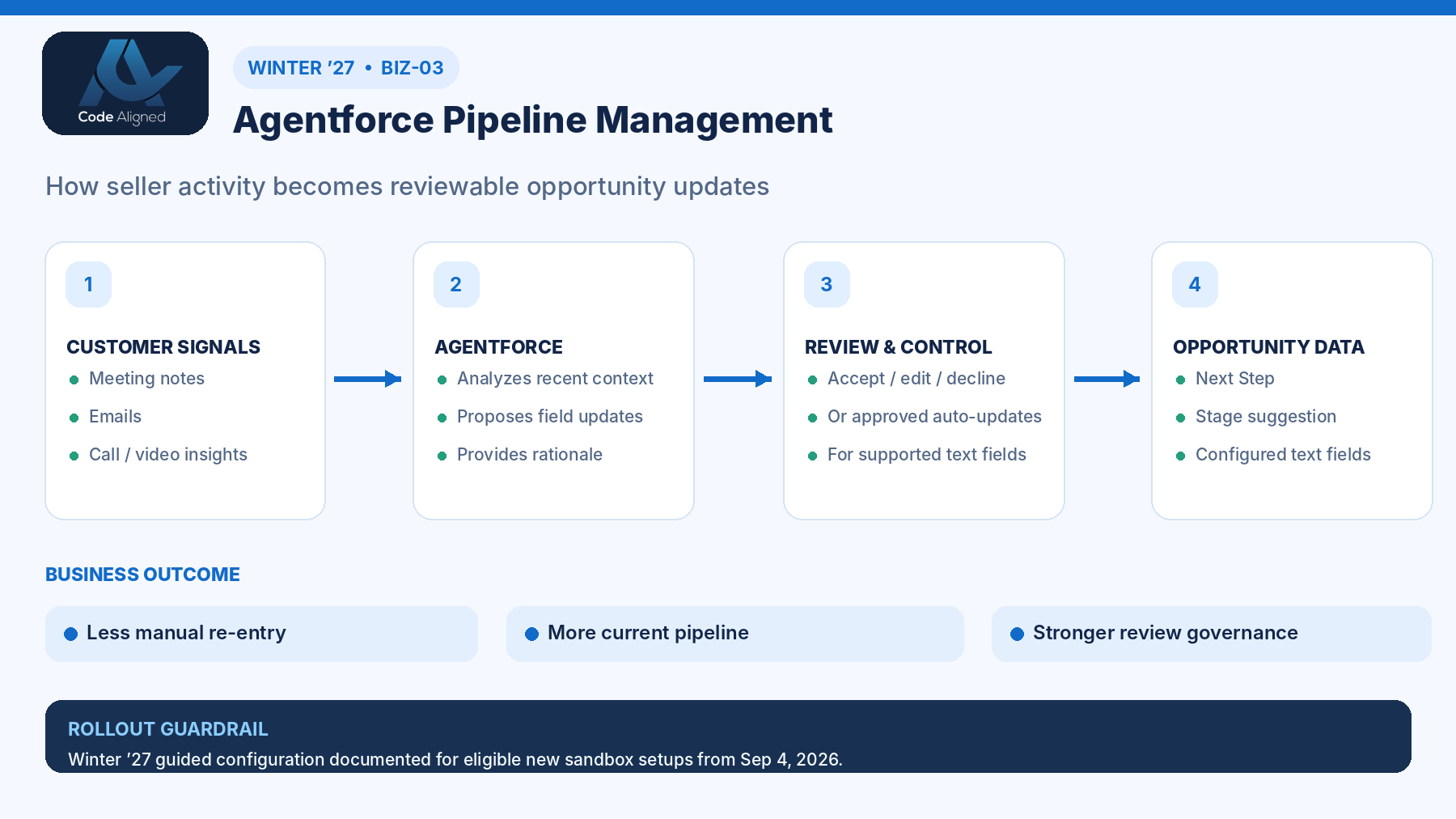
- It reads eligible grounding data. Opportunity notes, emails captured with Einstein Activity Capture, and voice or video call transcripts from Einstein Conversation Insights. At least one source is required.
- It suggests field updates. Out-of-the-box prompt templates recommend a Next Step and a Stage. The Stage recommendation draws on stage descriptions you write. You can extend the setup to other text fields.
- It shows its reasoning. Each suggested update references the source context behind it, so sellers can see why the agent proposed it.
- Sellers review in Pipeline Inspection. Users with access to the opportunity review the agent’s suggestions there and accept or edit them.
- It runs on a schedule. A cloned Process Field Update Suggestions flow runs once, daily, or weekly against the opportunities you choose.
What’s new in Winter ’27: guided setup in Salesforce Go
The Winter ’27 change is about setup, not a new capability. Salesforce adds a guided setup for Pipeline Management in Salesforce Go, the Setup area for discovering and activating features, so admins can follow a single guided path instead of piecing together separate steps.
Check the scope before you plan around it
The guided setup is documented for eligible new sandbox configurations beginning September 4, 2026. It doesn’t apply to existing setups, and it isn’t documented as generally available in production. Existing configurations continue to follow Salesforce’s setup guidance for versions before Winter ’27.
For a team evaluating Pipeline Management for the first time, this makes a sandbox proof of concept easier to start. It doesn’t remove the design decisions covered below.
Before vs after
A conceptual comparison of how opportunity data gets updated. Actual results depend on your data sources, configuration, and adoption.
| Activity | Manual updates | With Pipeline Management |
|---|---|---|
| Capturing what happened | Seller retypes call and email outcomes into fields | Agent reads notes, emails, and call transcripts already in Salesforce |
| Next Step | Updated when the seller remembers | Suggested on the flow’s schedule, with source context |
| Stage | Often changed just before forecast calls | Suggested against your stage descriptions, then reviewed by the seller |
| Manager visibility | Depends on chasing sellers | Pipeline Inspection shows which opportunities have suggestions waiting for review |
| Control | Fully manual | Suggestion mode by default. Autonomous updates for supported fields only if you choose them. |
An illustrative discovery-call scenario
This hypothetical scenario illustrates the workflow. It isn’t a Code Aligned client story and doesn’t describe measured results.
An account executive runs a discovery call with a prospective customer. The call is recorded and transcribed through Einstein Conversation Insights. During the call, the customer’s operations lead confirms the budget owner, says their IT team must complete a security review, and suggests a follow-up meeting in two weeks.
That night, the scheduled flow runs. The next morning the seller opens Pipeline Inspection and sees that the opportunity has suggestions waiting:
- Next Step: “Schedule security review with customer IT; send architecture overview before the follow-up meeting.” The rationale points to the call transcript.
- Stage: a suggestion to advance the opportunity, based on how the call matches your stage description for qualification.
The seller accepts the Next Step as written. They hold the Stage change because the budget owner hasn’t yet confirmed timing, which is exactly the kind of judgment that should stay with a person. Five minutes of review replaces rewriting call notes into fields, and the manager sees a current Next Step without asking for it.
Suggested vs autonomous updates
Salesforce’s implementation guide is explicit: by default, the agent suggests field updates. Turning on autonomous updates is a setting you choose.
| Consideration | Suggestion mode (default) | Autonomous updates |
|---|---|---|
| Who applies the change | The seller accepts or edits each suggestion | The agent applies updates to supported fields |
| Best suited to | Pilots, Stage, and any field that drives forecasts | Supported text fields, such as Next Step, once output quality is proven |
| Risk | Review backlog if sellers ignore suggestions | An incorrect update reaches the record without review |
Our recommendation: start every field in suggestion mode. Treat Stage as review-based, because Stage changes affect forecasts, reporting, and often automation. Don’t plan on Stage moving autonomously. Consider autonomous updates only for supported text fields, and only after the pilot shows sellers rarely need to edit them. Check Salesforce’s current setup and considerations documentation for which fields support autonomous updates in your release.
Licenses and prerequisites
| Area | What to confirm |
|---|---|
| Edition and license | Lightning Experience in Enterprise, Performance, or Unlimited edition with the Agentforce for Sales add-on, or Agentforce 1 Sales edition |
| Generative AI | Einstein generative AI turned on. The implementation guide enables it through Salesforce Go. |
| Data sources | At least one of: Salesforce notes, Einstein Activity Capture for email, or Einstein Conversation Insights for call transcripts |
| Pipeline Inspection | In use, or ready to roll out, because it’s where sellers review suggestions |
| Stage descriptions | A clear description for each Stage value, especially custom stages |
| Winter ’27 guided setup | Only for eligible new sandbox configurations beginning September 4, 2026 |
Step-by-step implementation roadmap
Use Salesforce’s Set Up Agentforce Pipeline Management documentation for exact steps. This roadmap shows the decisions around them.
1. Plan
- Define the fields you want managed (Next Step, Stage, and any custom text fields), with an owner for each.
- Audit data sources. Check how consistently notes, emails, and calls are captured and linked to opportunities. Sparse data means sparse suggestions.
- Choose cadence and mode. Decide how often suggestions run and keep suggestion mode for the pilot.
2. Enable
- Pick the setup path. For an eligible new sandbox configuration from September 4, 2026, use the guided setup in Salesforce Go. Otherwise, follow the existing setup documentation.
- Turn on prerequisites: Einstein generative AI, Pipeline Management, and the data sources you chose. If you use Einstein Conversation Insights, decide how the agent gets access to calls.
- Assign permission sets to admins, sellers, and the agent user (see Governance and security below).
3. Configure
- Write stage descriptions that reflect your real exit criteria.
- Clone and activate the Process Field Update Suggestions flow. Set which opportunities it covers and how often it runs.
- Create the agent from the Sales Management template in Agentforce Builder, as Salesforce recommends.
4. Test and pilot
- Test with opportunities that have recent notes, emails, or call transcripts
- Confirm suggestions appear in Pipeline Inspection with source context
- Check that the agent user is on the opportunity team with Read/Write access
- Verify that sellers can accept and edit, and that users without access see nothing
- Review Stage suggestions against your stage descriptions with a sales manager
- Monitor for paused or failed flow interviews after each scheduled run
Run the pilot with one team for a defined period before expanding. Then decide, field by field, whether any should move to autonomous updates.
Governance and security
Salesforce’s implementation guide lists the permission sets involved. Assign them deliberately:
- Sellers: Use Agentforce Pipeline Management, so they can review, edit, and accept suggestions.
- Agent user: the Pipeline Management and Sales Management autonomous-user permission sets, plus call access if you use call transcripts, so the agent can read opportunities and grounding data.
- Admins: permissions to manage the agent, prompt templates, and flows.
- Usage billing: the guide says to assign the UnmeteredUserBasedAI permission set to the agent user and to every human user who works with the agent. Without it, their AI activity can incur usage-based charges.
For responsible AI, use the controls the product already gives you:
- Keep a person in the loop with suggestion mode, especially for Stage.
- Limit scope through the flow’s opportunity criteria and the fields you include.
- Rely on the source rationale so reviewers can check each suggestion against what was actually said.
- Turn on Agent Analytics and Prompt Builder usage and feedback metrics in Einstein Feedback and Monitoring Setup.
- Tell sellers and customers how calls and emails are captured, in line with your recording-consent and privacy obligations.
Measuring a pilot without guesswork
We don’t quote time savings or forecast improvements, because they depend on your data and process. Measure your own instead. Capture a baseline before the pilot, then track:
- Next Step freshness: share of open opportunities with Next Step updated in the last 14 days
- Acceptance rate: suggestions accepted as written, edited, or ignored
- Stage accuracy: a manager’s spot-check of Stage suggestions against stage descriptions
- Seller admin time: self-reported time spent updating opportunities, before and during the pilot
- Data coverage: share of pilot opportunities with usable notes, emails, or call transcripts
- Reliability: flow failures and opportunities where the agent isn’t assigned
To estimate ROI, set the change in seller admin time and data freshness against licensing, setup, and change-management costs. Use your own figures, not a vendor’s averages.
Limitations to plan for
- No data, no suggestions. Opportunities without linked notes, emails, or transcripts won’t get useful suggestions.
- Stage quality depends on your descriptions. Vague stage descriptions produce vague Stage suggestions.
- Scheduled, not instant. Suggestions arrive on the flow’s schedule, not as the call ends.
- Agent access. The agent must be on the opportunity team. If it isn’t assigned, nothing happens for that record.
- Customization takes effort. External sources such as third-party call tools, and extra custom fields, need flow and prompt template changes plus testing.
- Guided setup scope. The Winter ’27 Salesforce Go setup covers eligible new sandbox configurations only, as documented.
- AI can be wrong. Suggestions are drafts for review, not facts. Your governance should assume some will need correcting.
Frequently asked questions
Is Agentforce Pipeline Management new in Winter ’27?
No. Pipeline Management was available before Winter ’27 and appears in earlier Salesforce release notes. What Winter ’27 adds is a guided setup in Salesforce Go, documented for eligible new sandbox configurations beginning September 4, 2026.
Which licenses do we need?
Salesforce documents Pipeline Management for Lightning Experience in Enterprise, Performance, and Unlimited editions with the Agentforce for Sales add-on, or included in Agentforce 1 Sales edition. Confirm your org’s entitlements with your Salesforce account team before planning a rollout.
Can the agent change an opportunity’s Stage on its own?
Plan for Stage to be review-based. The agent uses your stage descriptions to suggest Stage updates, and Stage changes affect forecasts and reporting. Check Salesforce’s current considerations for which fields support autonomous updates, and keep a seller or manager in the loop for Stage.
Do we have to let the agent update records automatically?
No. By default the agent suggests updates for sellers to review. Autonomous updates are a setting you choose to turn on, and only for supported fields. Many teams start in suggestion mode and expand once they trust the output.
Where does the agent get its information?
From grounding data linked to the opportunity: Salesforce notes, emails captured with Einstein Activity Capture, and voice or video call transcripts from Einstein Conversation Insights. At least one source is required. External sources can be added by customizing the Get Opportunity Grounding Data flow.
Can we use the new Salesforce Go guided setup in production or on an existing setup?
Don’t assume so. The Winter ’27 guided setup is documented for eligible new sandbox configurations beginning September 4, 2026. Existing configurations continue to follow Salesforce’s existing setup documentation. Check the release notes for any change before planning a production rollout.
Can Pipeline Management update our custom fields?
Salesforce’s implementation guide describes extending Pipeline Management to custom text fields on opportunities by adding them to the Process Field Update Suggestions flow and creating a prompt template modeled on Recommend Next Step for Opportunity. Treat this as a configuration project with its own testing.
Official Salesforce sources
Product behavior in this article is based on the following Salesforce documentation. Check it for current edition, rollout, and setup details before you implement.
- Salesforce Winter ’27 release notes
- Winter ’26 release note: automating seller tasks and maintaining pipeline hygiene with agents
- Set Up Agentforce Pipeline Management
- Set Up Agentforce Pipeline Management (for versions prior to Winter ’27)
- Agentforce for Sales Pipeline Management implementation guide (PDF)
- Guidelines and limits for Pipeline Inspection